

Pro Tips
Website UX
Why You Should Regularly Review Your Website (And How Often to Do It)
Why You Should Regularly Review Your Website (And How Often to Do It)
13 sty 2026
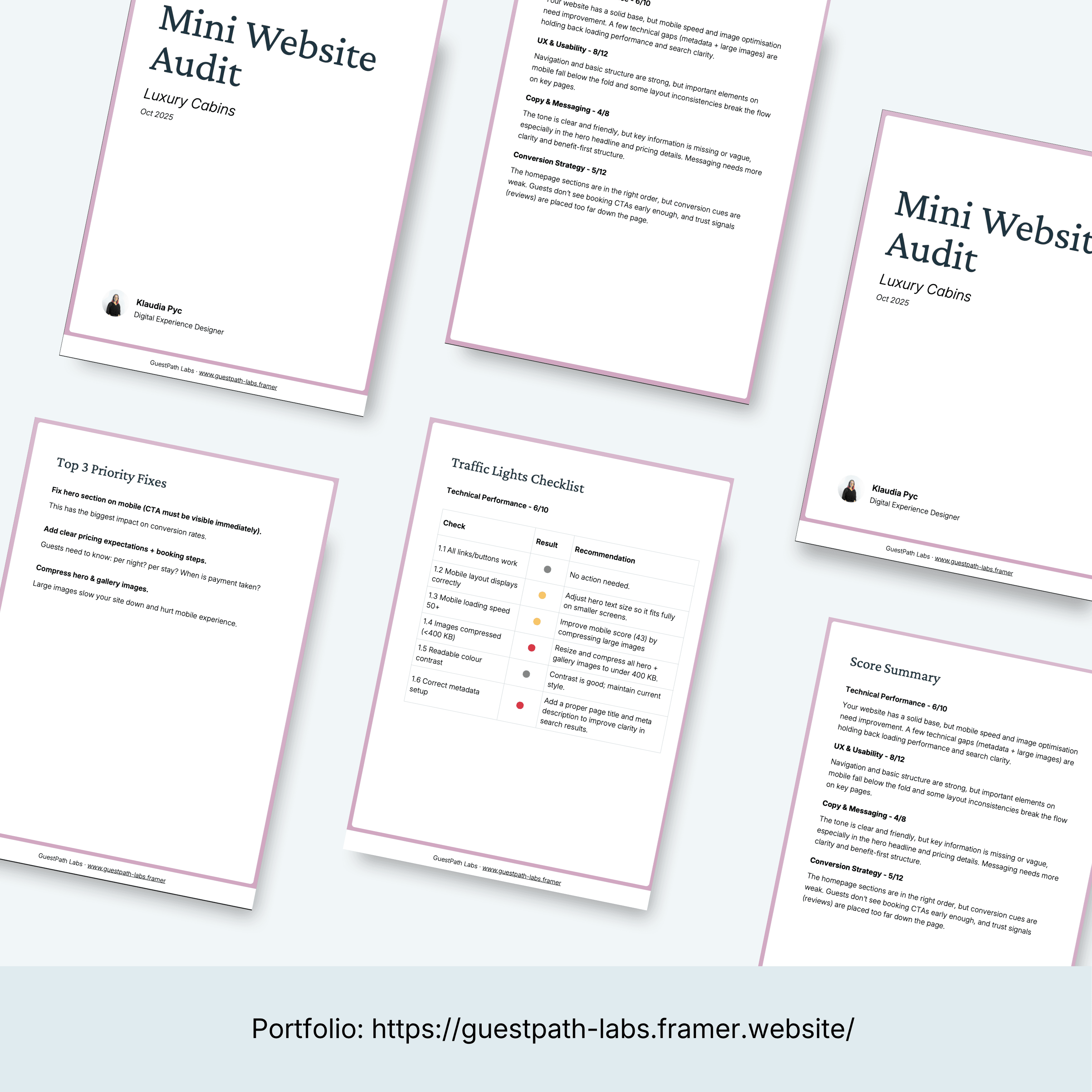
Example of a health check report
A website isn’t a “set it and forget it” thing. It’s a living part of your business.
You update your prices. You add or remove services. You change photos. Trends shift. Your business evolves. And on top of that, the web itself changes - links break, tools expire, images stop loading, mobile layouts break after platform updates.
Sometimes, everything looks fine on the surface. But websites have a sneaky way of falling apart behind the scenes. Most of the time, you won’t get a warning. People just stop visiting.
That’s why doing a regular website UX health check matters more than most business owners realise. And this is why I created my DIY Website UX Health Check Matrix - a simple, structured way to review your website regularly and catch issues early, before they turn into lost enquiries or bookings.
How often should you review or redesign a website?
Full website redesigns usually happen every 2–3 years on average, depending on industry and how fast the business changes. Sometimes sooner - for example, when:
your business offering changes significantly
your website no longer supports bookings or enquiries properly
design trends shift so much that the site feels outdated or untrustworthy
But here’s the important part:
Most websites don’t need a full redesign as often as people think.
In many cases, you can delay (or completely avoid) a costly redesign by doing regular health checks and fixing small but high-impact issues early.
Why small issues cause big problems
A website can look “fine” and still perform badly.
Common examples:
a broken booking button
unclear headline or missing key information
mobile layout issues
confusing navigation
too many competing calls to action
slow loading due to oversized images
These things don’t always get reported. Users don’t email you to say they’re confused - they just leave.
That’s why reviewing your website from a clarity, usability, and conversion point of view is so important.
What a website UX health check actually looks at
A proper website review isn’t about colours or personal taste. It focuses on whether your site clearly supports your main business goal.
A solid UX health check typically looks at four core areas:
1. Technical performance
Does the site load properly?
Do links and buttons work?
Is the mobile version usable and readable?
If the basics fail here, users won’t even reach your content.
2. UX & usability
Can visitors instantly understand:
what you offer
who it’s for
where to click next
Good UX feels calm and obvious. Bad UX feels stressful and unclear- even if people can’t explain why.
3. Copy & messaging
Your website copy sets expectations.
Are things like pricing, location, parking, availability, and next steps clear? Or do users have to guess?
Missing or vague information often leads to abandoned sessions and bad reviews later.
4. Conversion flow
Does your website guide users naturally toward booking or enquiring?
Or are they distracted, unsure, or forced to hunt for the next step?
Small conversion issues are one of the biggest reasons “nice” websites don’t convert.
How often should you do a website health check?
A good rule of thumb:
Quick health check: every 3–6 months
After major changes: new services, pricing changes, new photos, platform updates
Before busy seasons or launches
This doesn’t mean redesigning - it means reviewing.
Think of it like servicing a car. You don’t replace the engine every year, but you do check that everything still works.
DIY vs professional website review
If you’re hands-on and want to understand your site better, a DIY audit is often enough to catch:
obvious clarity gaps
broken or confusing elements
quick wins that improve user experience
I created the DIY Website Health Check Kit - a simple, structured way to review your own site in 10–20 minutes, without tech jargon or guesswork
If you don’t want to analyse it yourself and just want to know:
what’s wrong
what’s unclear
what’s blocking conversions
I also offer small, focused website reviews, where I audit your site and give you a clear, prioritised summary - no fluff, no redesign pressure, just actionable feedback based on real UX principles.
Final thought
Most websites don’t fail because they’re ugly.
They fail because they slowly drift away from clarity.
Regular website UX health checks help you catch issues early, improve user confidence, and reduce the need for expensive redesigns later.
And most importantly - they help your website actually do its job.
A website isn’t a “set it and forget it” thing. It’s a living part of your business.
You update your prices. You add or remove services. You change photos. Trends shift. Your business evolves. And on top of that, the web itself changes - links break, tools expire, images stop loading, mobile layouts break after platform updates.
Sometimes, everything looks fine on the surface. But websites have a sneaky way of falling apart behind the scenes. Most of the time, you won’t get a warning. People just stop visiting.
That’s why doing a regular website UX health check matters more than most business owners realise. And this is why I created my DIY Website UX Health Check Matrix - a simple, structured way to review your website regularly and catch issues early, before they turn into lost enquiries or bookings.
How often should you review or redesign a website?
Full website redesigns usually happen every 2–3 years on average, depending on industry and how fast the business changes. Sometimes sooner - for example, when:
your business offering changes significantly
your website no longer supports bookings or enquiries properly
design trends shift so much that the site feels outdated or untrustworthy
But here’s the important part:
Most websites don’t need a full redesign as often as people think.
In many cases, you can delay (or completely avoid) a costly redesign by doing regular health checks and fixing small but high-impact issues early.
Why small issues cause big problems
A website can look “fine” and still perform badly.
Common examples:
a broken booking button
unclear headline or missing key information
mobile layout issues
confusing navigation
too many competing calls to action
slow loading due to oversized images
These things don’t always get reported. Users don’t email you to say they’re confused - they just leave.
That’s why reviewing your website from a clarity, usability, and conversion point of view is so important.
What a website UX health check actually looks at
A proper website review isn’t about colours or personal taste. It focuses on whether your site clearly supports your main business goal.
A solid UX health check typically looks at four core areas:
1. Technical performance
Does the site load properly?
Do links and buttons work?
Is the mobile version usable and readable?
If the basics fail here, users won’t even reach your content.
2. UX & usability
Can visitors instantly understand:
what you offer
who it’s for
where to click next
Good UX feels calm and obvious. Bad UX feels stressful and unclear- even if people can’t explain why.
3. Copy & messaging
Your website copy sets expectations.
Are things like pricing, location, parking, availability, and next steps clear? Or do users have to guess?
Missing or vague information often leads to abandoned sessions and bad reviews later.
4. Conversion flow
Does your website guide users naturally toward booking or enquiring?
Or are they distracted, unsure, or forced to hunt for the next step?
Small conversion issues are one of the biggest reasons “nice” websites don’t convert.
How often should you do a website health check?
A good rule of thumb:
Quick health check: every 3–6 months
After major changes: new services, pricing changes, new photos, platform updates
Before busy seasons or launches
This doesn’t mean redesigning - it means reviewing.
Think of it like servicing a car. You don’t replace the engine every year, but you do check that everything still works.
DIY vs professional website review
If you’re hands-on and want to understand your site better, a DIY audit is often enough to catch:
obvious clarity gaps
broken or confusing elements
quick wins that improve user experience
I created the DIY Website Health Check Kit - a simple, structured way to review your own site in 10–20 minutes, without tech jargon or guesswork
If you don’t want to analyse it yourself and just want to know:
what’s wrong
what’s unclear
what’s blocking conversions
I also offer small, focused website reviews, where I audit your site and give you a clear, prioritised summary - no fluff, no redesign pressure, just actionable feedback based on real UX principles.
Final thought
Most websites don’t fail because they’re ugly.
They fail because they slowly drift away from clarity.
Regular website UX health checks help you catch issues early, improve user confidence, and reduce the need for expensive redesigns later.
And most importantly - they help your website actually do its job.
Let's Talk!
Are you a small hospitality business owner who wants clearer online setup, smoother guest communication, or simply less admin stress?