

UX for Hospitality
Customer Communication
Key Guest Communication for Short-Term Vacation Rentals
Key Guest Communication for Short-Term Vacation Rentals
4 Essential Automated Guest Messages Every Host Should Send
23 Dec 2025

If you run a short-term vacation rental - whether it’s on Airbnb, Booking.com, or via direct bookings - guest experience doesn’t start at check-in. and you can help or hinder your guest's experience before they even arrive at your property.
They start to form opinions about the stay and you as a host as you start communicating, sending them check-in info, property directions and anything else that is important for them to know before they arrive.
The key to great guest experience is clear, minimal, well-timed messages that answer questions before guests even realise they have them, without spamming their inbox.
Throughout my work with multiple Superhosts, auditing real guest journeys and my own travel, one thing comes up again and again - most confusion, stress and sometimes even worse than perfect reviews come from missing or badly timed communication - not from the stay itself.
This article breaks down:
why guest messaging matters,
what makes a “good” message,
the key guest touchpoints you should cover,
and 4 short, ready-to-use message templates you can adapt to your rental.
Why key guest messaging matters in short-term rentals
Every message you send is a touchpoint in the guest journey.
Done well, these messages:
answer the most common guest questions upfront,
reassure guests that the booking is real and well organised,
reduce last-minute messages and admin work,
and position you as a friendly, reliable host - which strongly influences reviews.
Here is what research has to say about guest communication:
Airbnb’s own host guidance highlights that hosts should send clear, timely messages to set the tone for a great stay — emphasizing responsiveness and clarity.
Hospitality UX research (including studies summarised by platforms like Nielsen Norman Group) shows that uncertainty and surprises are key drivers of dissatisfaction.
This guest communication study (by a vacation rental tech company) shows what communication frequency and types guests prefer and that guests link communication to satisfaction and positive reviews:
Multiple host-community studies and Superhost interviews point to the same thing: guests prefer clear, timely information over reactive support.
Research on notification fatigue shows that too many automated messages can overwhelm users and reduce engagement - even when the information is relevant. Modern UX practice increasingly favours fewer, well-timed messages over constant communication.
Personalisation has been shown to improve engagement when it feels helpful rather than intrusive. Using a guest’s name, acknowledging context, and adapting communication based on their behaviour leads to a better experience than sending the same twenty automated messages to everyone.
Rules of good guest messages
Before we get to templates, a few ground rules that apply to all short-term vacation rental messaging.
1. Keep it short and to the point
Avoid long paragraphs and unnecessary explanations, these may feel like you're making excuses rather than informing the guest. This is especially important if you host international guests or non-native speakers.
If a message can’t be scanned in 10 seconds, it’s too long.
2. Cover common questions - without over-explaining
Your messages should clarify:
check-in basics,
key house rules,
what to do if something goes wrong,
where to find detailed info.
But they shouldn’t explain everything in one place- that’s what a welcome book or guide is for.
3. Send messages at the right time
Timing is critical.
Sending the right message at the wrong moment creates stress instead of clarity - and research shows that poorly timed communication can feel pushy or overwhelming.
The 4 most important guest touchpoints (and why they matter)
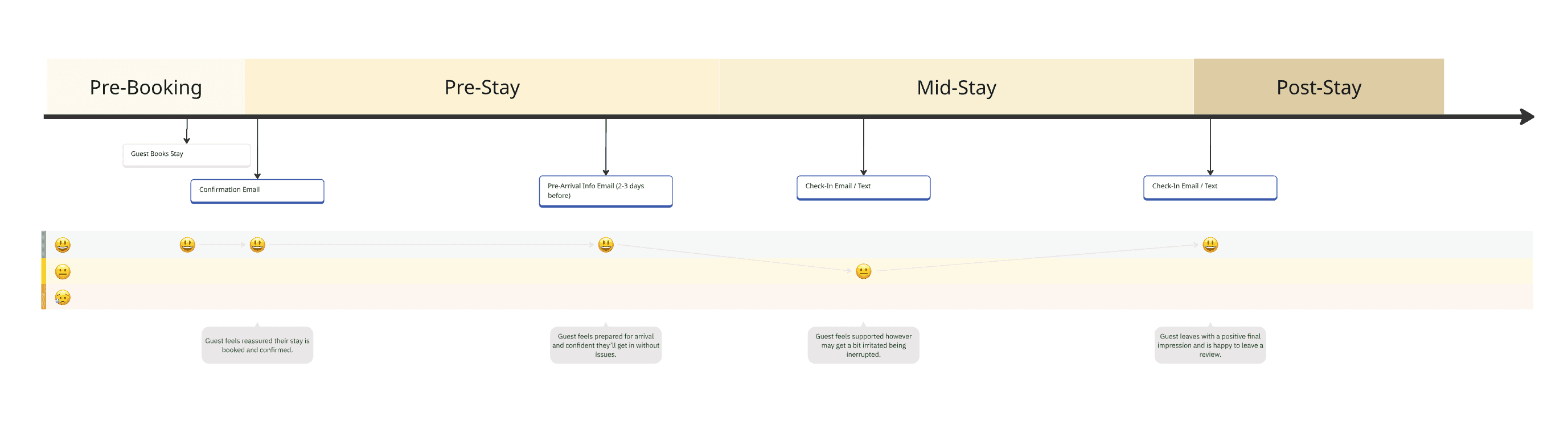
Guest Journey Map highlighting the key messages and guest’s experience*.
1. Pre-stay: Booking confirmation
Purpose: reassurance and trust
This message confirms the booking, sets expectations, and tells guests what will happen next. It should not include long instructions.
2. Pre-stay: Arrival reminder
Purpose: reduce confusion and last-minute questions, provide information
This is where you share check-in info and link to your welcome book or digital guide - while still including a short summary in case guests don’t open it.
3. Mid-stay: Optional check-in
Purpose: support without intrusion
Research and Superhost experience both show that unsolicited mid-stay messages are often unwelcome, especially for short stays. This is the stage where you can personalise the experience a bit more.
This message works best when:
the stay is longer,
the property has complex appliances,
or the guests were chatty and happy to communicate
One message only. No follow-ups unless the guest responds.
4. Post-stay: Goodbye & review
Purpose: close the loop & encourage reviews
Guests are most likely to leave reviews shortly after checkout - especially if the experience felt organised and personal. Feel free to include any returning guest discounts or information in here.
Ready-to-use guest message templates
These are written to be short, friendly, and professional, and can be used across Airbnb, Booking.com, or direct bookings.
1. Booking confirmation message
When to send: immediately after booking
Hi {{Guest Name}},
Thanks so much for your booking - we’re excited to host you!
Your reservation is confirmed for {{dates}}. A few days before your arrival, I’ll send you all the check-in details and important information for your stay.
If you have any questions in the meantime, feel free to message me.
Best wishes,
{{Host Name}}
2. Pre-arrival message (with welcome book)
When to send: 2–3 days before arrival
Hi {{Guest Name}},
Your stay is coming up soon - we’re looking forward to welcoming you!
📍 Check-in details:
{{Short check-in summary here - e.g. time, lock type, key pickup}}For full instructions, house info, and local tips, please see our welcome guide here:
{{Link to welcome book}}If anything is unclear, just let me know - happy to help.
Safe travels,
{{Host Name}}
3. Optional mid-stay check-in
When to send: day 1 or 2 of longer stays
Only send once
Hi {{Guest Name}},
Just a quick note to check that everything is going well so far.
If you have any questions about the place or need help with anything, feel free to message me. Otherwise, enjoy your stay!
{{Host Name}}
4. Post-stay goodbye & review request
When to send: shortly after checkout
Hi {{Guest Name}},
Thanks again for staying with us - I hope you had a great time.
If you have a moment, I’d really appreciate you leaving a review. Your feedback helps us improve and helps future guests too.
If you ever plan to visit again, feel free to reach out - returning guests are always welcome.
All the best,
{{Host Name}}
Final thoughts
Clear, well-timed messaging is one of the highest-impact improvements you can make to your short-term vacation rental - and one of the easiest to automate.
If these templates feel close but not quite your style, or if you want more guidance:
I offer a Guest Communication Toolkit with
key messages written in 3 different tones,
guidance on additional personalised messages,
and step-by-step instructions for setting up automated messages on Airbnb and Booking.com.
👉 You can find it in my Etsy shop.
Happy hosting!
*This is a simplified guest journey I use to understand how my clients’ guests move through the entire stay, from booking to checkout. It helps show what guests are likely thinking and feeling at each stage, and where clear communication matters most.
This kind of journey mapping is what real product teams use to make sure experiences are clear, predictable, and easy to follow. If you’d like to learn how to map your own guest journey in more detail, I also offer a step-by-step toolkit for this in my Etsy shop.
If you run a short-term vacation rental - whether it’s on Airbnb, Booking.com, or via direct bookings - guest experience doesn’t start at check-in. and you can help or hinder your guest's experience before they even arrive at your property.
They start to form opinions about the stay and you as a host as you start communicating, sending them check-in info, property directions and anything else that is important for them to know before they arrive.
The key to great guest experience is clear, minimal, well-timed messages that answer questions before guests even realise they have them, without spamming their inbox.
Throughout my work with multiple Superhosts, auditing real guest journeys and my own travel, one thing comes up again and again - most confusion, stress and sometimes even worse than perfect reviews come from missing or badly timed communication - not from the stay itself.
This article breaks down:
why guest messaging matters,
what makes a “good” message,
the key guest touchpoints you should cover,
and 4 short, ready-to-use message templates you can adapt to your rental.
Why key guest messaging matters in short-term rentals
Every message you send is a touchpoint in the guest journey.
Done well, these messages:
answer the most common guest questions upfront,
reassure guests that the booking is real and well organised,
reduce last-minute messages and admin work,
and position you as a friendly, reliable host - which strongly influences reviews.
Here is what research has to say about guest communication:
Airbnb’s own host guidance highlights that hosts should send clear, timely messages to set the tone for a great stay — emphasizing responsiveness and clarity.
Hospitality UX research (including studies summarised by platforms like Nielsen Norman Group) shows that uncertainty and surprises are key drivers of dissatisfaction.
This guest communication study (by a vacation rental tech company) shows what communication frequency and types guests prefer and that guests link communication to satisfaction and positive reviews:
Multiple host-community studies and Superhost interviews point to the same thing: guests prefer clear, timely information over reactive support.
Research on notification fatigue shows that too many automated messages can overwhelm users and reduce engagement - even when the information is relevant. Modern UX practice increasingly favours fewer, well-timed messages over constant communication.
Personalisation has been shown to improve engagement when it feels helpful rather than intrusive. Using a guest’s name, acknowledging context, and adapting communication based on their behaviour leads to a better experience than sending the same twenty automated messages to everyone.
Rules of good guest messages
Before we get to templates, a few ground rules that apply to all short-term vacation rental messaging.
1. Keep it short and to the point
Avoid long paragraphs and unnecessary explanations, these may feel like you're making excuses rather than informing the guest. This is especially important if you host international guests or non-native speakers.
If a message can’t be scanned in 10 seconds, it’s too long.
2. Cover common questions - without over-explaining
Your messages should clarify:
check-in basics,
key house rules,
what to do if something goes wrong,
where to find detailed info.
But they shouldn’t explain everything in one place- that’s what a welcome book or guide is for.
3. Send messages at the right time
Timing is critical.
Sending the right message at the wrong moment creates stress instead of clarity - and research shows that poorly timed communication can feel pushy or overwhelming.
The 4 most important guest touchpoints (and why they matter)
Guest Journey Map highlighting the key messages and guest’s experience*.
1. Pre-stay: Booking confirmation
Purpose: reassurance and trust
This message confirms the booking, sets expectations, and tells guests what will happen next. It should not include long instructions.
2. Pre-stay: Arrival reminder
Purpose: reduce confusion and last-minute questions, provide information
This is where you share check-in info and link to your welcome book or digital guide - while still including a short summary in case guests don’t open it.
3. Mid-stay: Optional check-in
Purpose: support without intrusion
Research and Superhost experience both show that unsolicited mid-stay messages are often unwelcome, especially for short stays. This is the stage where you can personalise the experience a bit more.
This message works best when:
the stay is longer,
the property has complex appliances,
or the guests were chatty and happy to communicate
One message only. No follow-ups unless the guest responds.
4. Post-stay: Goodbye & review
Purpose: close the loop & encourage reviews
Guests are most likely to leave reviews shortly after checkout - especially if the experience felt organised and personal. Feel free to include any returning guest discounts or information in here.
Ready-to-use guest message templates
These are written to be short, friendly, and professional, and can be used across Airbnb, Booking.com, or direct bookings.
1. Booking confirmation message
When to send: immediately after booking
Hi {{Guest Name}},
Thanks so much for your booking - we’re excited to host you!
Your reservation is confirmed for {{dates}}. A few days before your arrival, I’ll send you all the check-in details and important information for your stay.
If you have any questions in the meantime, feel free to message me.
Best wishes,
{{Host Name}}
2. Pre-arrival message (with welcome book)
When to send: 2–3 days before arrival
Hi {{Guest Name}},
Your stay is coming up soon - we’re looking forward to welcoming you!
📍 Check-in details:
{{Short check-in summary here - e.g. time, lock type, key pickup}}For full instructions, house info, and local tips, please see our welcome guide here:
{{Link to welcome book}}If anything is unclear, just let me know - happy to help.
Safe travels,
{{Host Name}}
3. Optional mid-stay check-in
When to send: day 1 or 2 of longer stays
Only send once
Hi {{Guest Name}},
Just a quick note to check that everything is going well so far.
If you have any questions about the place or need help with anything, feel free to message me. Otherwise, enjoy your stay!
{{Host Name}}
4. Post-stay goodbye & review request
When to send: shortly after checkout
Hi {{Guest Name}},
Thanks again for staying with us - I hope you had a great time.
If you have a moment, I’d really appreciate you leaving a review. Your feedback helps us improve and helps future guests too.
If you ever plan to visit again, feel free to reach out - returning guests are always welcome.
All the best,
{{Host Name}}
Final thoughts
Clear, well-timed messaging is one of the highest-impact improvements you can make to your short-term vacation rental - and one of the easiest to automate.
If these templates feel close but not quite your style, or if you want more guidance:
I offer a Guest Communication Toolkit with
key messages written in 3 different tones,
guidance on additional personalised messages,
and step-by-step instructions for setting up automated messages on Airbnb and Booking.com.
👉 You can find it in my Etsy shop.
Happy hosting!
*This is a simplified guest journey I use to understand how my clients’ guests move through the entire stay, from booking to checkout. It helps show what guests are likely thinking and feeling at each stage, and where clear communication matters most.
This kind of journey mapping is what real product teams use to make sure experiences are clear, predictable, and easy to follow. If you’d like to learn how to map your own guest journey in more detail, I also offer a step-by-step toolkit for this in my Etsy shop.

Let's Talk!
Are you a small hospitality business owner who wants clearer online setup, smoother guest communication, or simply less admin stress?