

Automations & Workflows
Why a Proper Booking System Changes Everything for Tour & Service Businesses
Why a Proper Booking System Changes Everything for Tour & Service Businesses
11 Aug 2025
Have you ever found yourself buried under messages from guests or clients?
“Do you still have space at 4pm?”
“Did you get my waiver?”
“What should I bring?”
“Where exactly do we meet?”
“Is my booking confirmed??”
After a while, you’re juggling so many details that one thought keeps repeating:
“I hope I haven’t forgotten anyone…”
For growing hospitality, adventure, and service-based businesses, this is the moment when manual scheduling stops being “fine for now” and becomes a full-time stressor.
Let’s walk through why that happens - and how the right scheduling tool solves it.
Or skip the read and 👉 Get the ready-to-use Acuity Booking Setup on Etsy
(Now 75% off with 'HELLO2026' code)
The Hidden Cost of Manual Scheduling
At first, managing bookings through email or Instagram messages feels manageable.
But as soon as you offer:
multiple tours
recurring services
group availability
equipment rentals
waivers
different guest needs
…it becomes chaotic.
You end up asking yourself:
Do I still have space at this hour?
Did that family ever send the waiver?
Who needed beginner-friendly route again?
Did I get their fitness level?
Did I reply to everyone?
This is exactly the type of cognitive overload described in Cognitive Load Theory, which states that people struggle when they must hold too many pieces of information in working memory at once (Sweller, 1988).
It’s not you.
It’s the system you’re using.
Why Messaging Matters
When guests book an experience - especially travel or outdoor activities - their mental focus shifts to planning mode.
Based on the Uncertainty Reduction Theory in psychology (Berger & Calabrese, 1975), people experience stress when they don’t know what will happen next, or whether their action was successful.
This is why guests often think:
“I booked this weeks ago… is it still happening?”
“I haven’t heard anything since paying, should I worry?”
“What do I need to pack? Where do I go? When should I arrive?”
And this lines up with Nielsen Norman Group’s UX Heuristic: Visibility of System Status, which states that users feel safer and more confident when systems communicate what’s happening and what will happen next.
Translation?
Guests want transparency.
They want confirmation.
They want next steps.
They want clarity.
Especially when planning travel.
When someone is thinking about:
getting time off
packing
driving to the location
finding parking
weather
their kids
their dog
their energy level
…the last thing they want is to wonder:
“Is this business going to ghost me?”
A clear, well-timed email flow removes that fear instantly.
Why a Good Scheduling Tool Is Non-Negotiable as You Grow
Once you start offering more experiences - or once bookings increase - you no longer need a “calendar.”
You need:
✔ a way to collect waivers
✔ a way to collect safety info
✔ a way to collect fitness or experience level
✔ a way to manage availability
✔ a way to reduce no-shows
✔ a way to send correct directions
✔ a way to prepare guests
✔ a way to move admin off your plate
That’s what a real scheduling system does for you.
Enter Acuity Scheduling: A Clean, Reliable Foundation
In short, Acuity is a flexible online booking system where guests can choose a service, complete required forms, sign waivers, and automatically receive all the emails they need.
It’s especially powerful for:
tours
outdoor experiences
wellness services
photography sessions
adventure operators
workshops and classes
You get:
appointment types
categories
custom forms with conditional questions
waiver checkboxes
add-ons (rentals, gear, private upgrades)
automated emails
availability per service
multiple calendars if needed
Everything happens automatically - and correctly - every single time.
How to Set Up a Clear, Guest-Friendly Flow in Acuity
Here’s a quick mini-guide to building a smooth service or tour booking system.
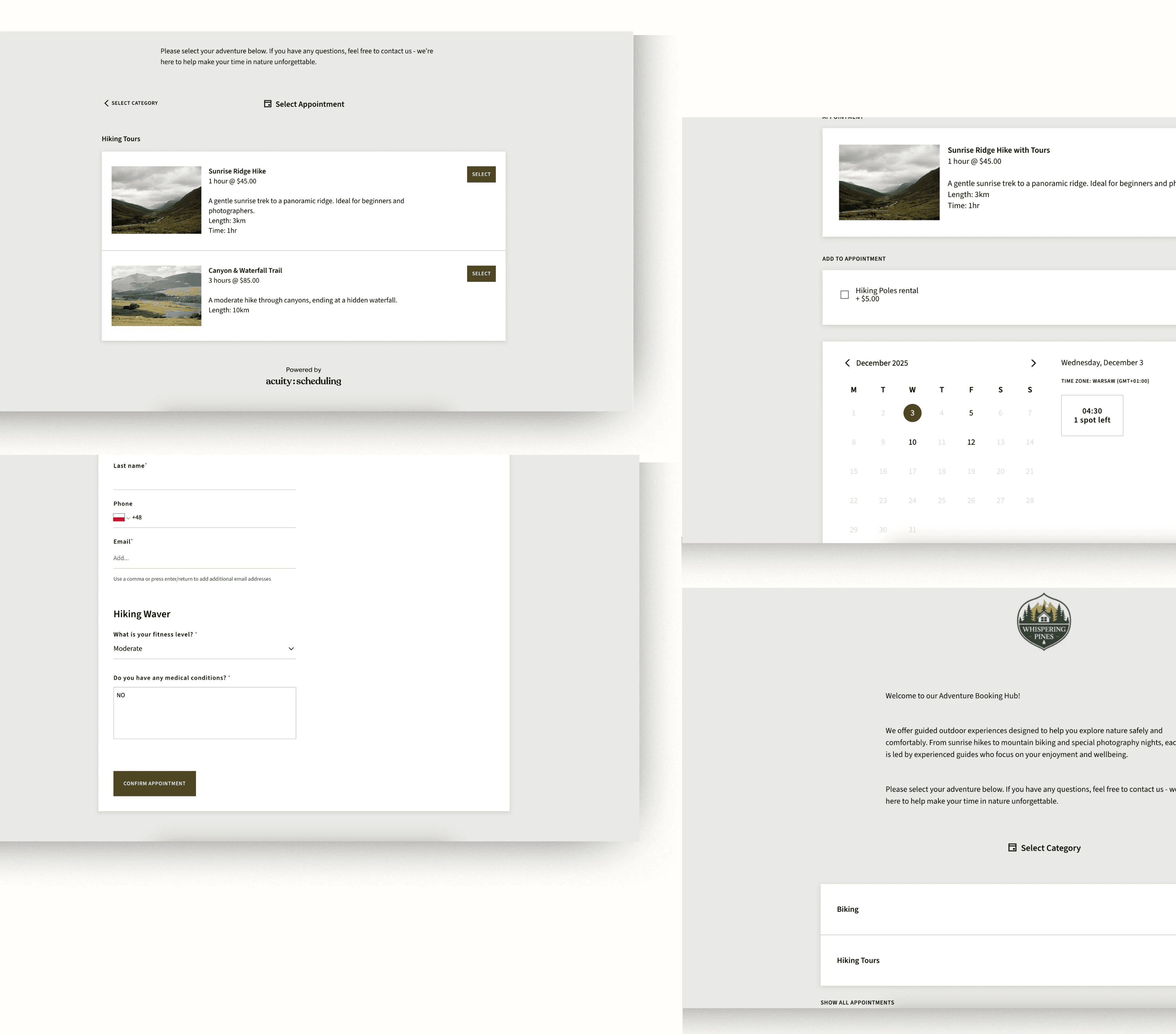
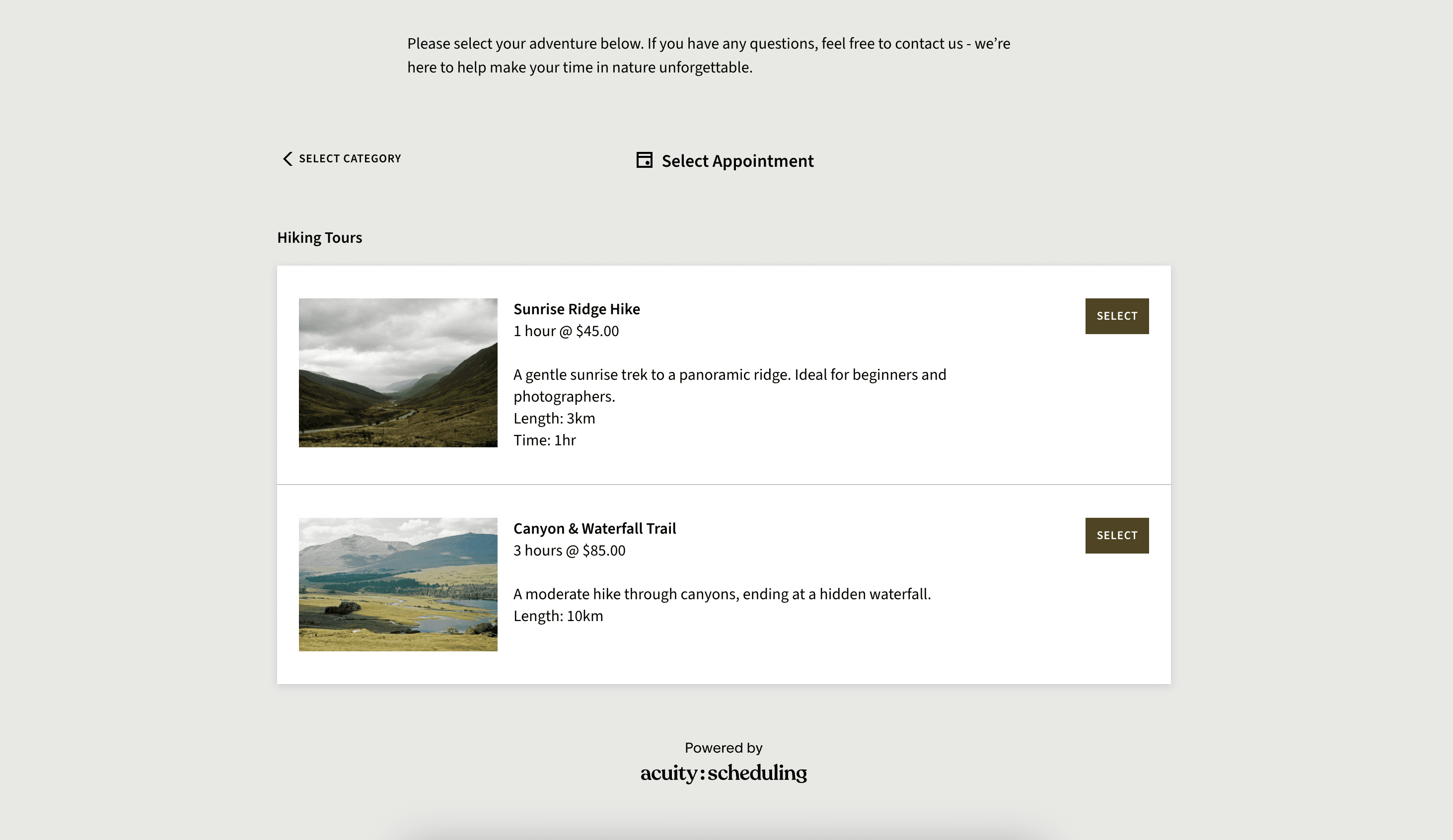
1. Create Categories
Helps guests scan and choose quickly.
Examples:
Hiking Tours
Biking Adventures
Horseback Riding
Wellness Services
Photography Experiences
2. Add Your Services / Tours
Each should have:
duration
price
description
maximum participants
custom availability
3. Build Smart Intake Forms
Include:
fitness level
experience level
equipment needs
allergies / medical notes
weight/height for horses
age if minors need consent
Use conditional logic wherever possible.
4. Add Waivers
A checkbox or linked PDF works perfectly.
5. Add Optional Add-Ons
Upsell gear, rentals, photos, picnics, private upgrades.
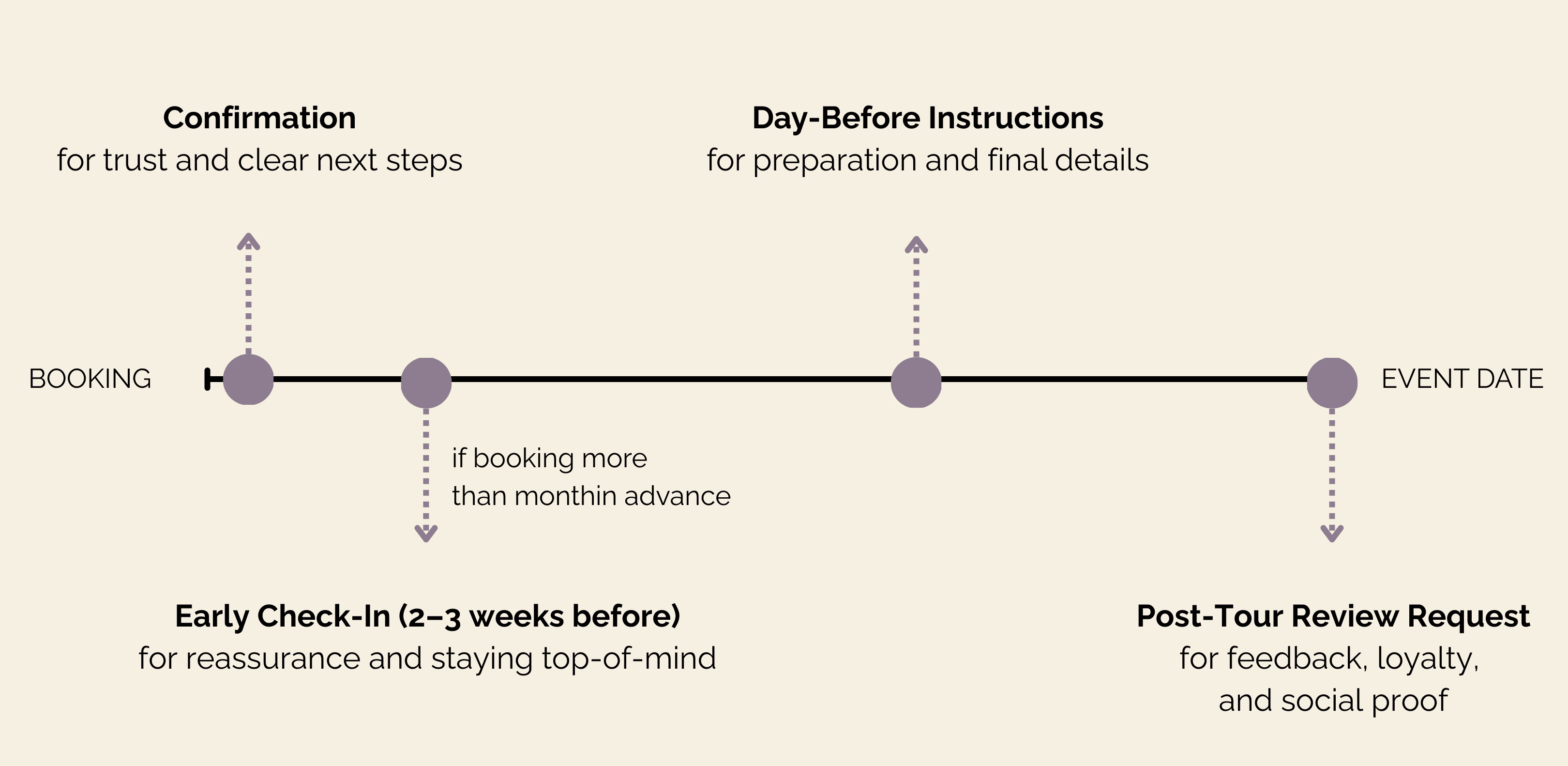
6. Write Your Automated Email Messages
These are your must-have touchpoints:
Booking Confirmation
“Here’s what happens next…”Early Check-In (3+ weeks before)
Keeps you top-of-mind and reassures guests.48-Hour Reminder
Weather, clothes, what to bring, last checks.Day-Before Instructions
Exact meeting point, parking, timing, guide contact.Post-Tour Review Request
Closes the loop.
These emails relieve guest uncertainty, reduce no-shows, and increase customer confidence - all backed by UX heuristics and behavioural psychology theories around clarity, predictability, and task completion.
The Bottom Line: A Good Booking System Is Guest Care
Clear communication is not “extra.”
It is the experience.
A thoughtful, automated booking flow:
reduces your stress
reduces guest stress
increases trust
increases professionalism
increases show-up rates
increases loyalty
increases word-of-mouth
Guests should feel supported from the moment they book, not left wondering.
And you should feel confident everything is handled - automatically.
Don’t Want to Set It Up Yourself? I Can Do It For You.
If you want a professional, guest-focused booking system built for your tours, experiences, or services, I offer a complete Acuity setup package:
👉 Get the ready-to-use Acuity Booking Setup on Etsy
Categories, forms, waivers, automations, availability - all done for you.
You focus on delivering great experiences.
Also available on Medium.com
I’ll handle the systems behind them.
Have you ever found yourself buried under messages from guests or clients?
“Do you still have space at 4pm?”
“Did you get my waiver?”
“What should I bring?”
“Where exactly do we meet?”
“Is my booking confirmed??”
After a while, you’re juggling so many details that one thought keeps repeating:
“I hope I haven’t forgotten anyone…”
For growing hospitality, adventure, and service-based businesses, this is the moment when manual scheduling stops being “fine for now” and becomes a full-time stressor.
Let’s walk through why that happens - and how the right scheduling tool solves it.
Or skip the read and 👉 Get the ready-to-use Acuity Booking Setup on Etsy
(Now 75% off with 'HELLO2026' code)
The Hidden Cost of Manual Scheduling
At first, managing bookings through email or Instagram messages feels manageable.
But as soon as you offer:
multiple tours
recurring services
group availability
equipment rentals
waivers
different guest needs
…it becomes chaotic.
You end up asking yourself:
Do I still have space at this hour?
Did that family ever send the waiver?
Who needed beginner-friendly route again?
Did I get their fitness level?
Did I reply to everyone?
This is exactly the type of cognitive overload described in Cognitive Load Theory, which states that people struggle when they must hold too many pieces of information in working memory at once (Sweller, 1988).
It’s not you.
It’s the system you’re using.
Why Messaging Matters
When guests book an experience - especially travel or outdoor activities - their mental focus shifts to planning mode.
Based on the Uncertainty Reduction Theory in psychology (Berger & Calabrese, 1975), people experience stress when they don’t know what will happen next, or whether their action was successful.
This is why guests often think:
“I booked this weeks ago… is it still happening?”
“I haven’t heard anything since paying, should I worry?”
“What do I need to pack? Where do I go? When should I arrive?”
And this lines up with Nielsen Norman Group’s UX Heuristic: Visibility of System Status, which states that users feel safer and more confident when systems communicate what’s happening and what will happen next.
Translation?
Guests want transparency.
They want confirmation.
They want next steps.
They want clarity.
Especially when planning travel.
When someone is thinking about:
getting time off
packing
driving to the location
finding parking
weather
their kids
their dog
their energy level
…the last thing they want is to wonder:
“Is this business going to ghost me?”
A clear, well-timed email flow removes that fear instantly.
Why a Good Scheduling Tool Is Non-Negotiable as You Grow
Once you start offering more experiences - or once bookings increase - you no longer need a “calendar.”
You need:
✔ a way to collect waivers
✔ a way to collect safety info
✔ a way to collect fitness or experience level
✔ a way to manage availability
✔ a way to reduce no-shows
✔ a way to send correct directions
✔ a way to prepare guests
✔ a way to move admin off your plate
That’s what a real scheduling system does for you.
Enter Acuity Scheduling: A Clean, Reliable Foundation
In short, Acuity is a flexible online booking system where guests can choose a service, complete required forms, sign waivers, and automatically receive all the emails they need.
It’s especially powerful for:
tours
outdoor experiences
wellness services
photography sessions
adventure operators
workshops and classes
You get:
appointment types
categories
custom forms with conditional questions
waiver checkboxes
add-ons (rentals, gear, private upgrades)
automated emails
availability per service
multiple calendars if needed
Everything happens automatically - and correctly - every single time.
How to Set Up a Clear, Guest-Friendly Flow in Acuity
Here’s a quick mini-guide to building a smooth service or tour booking system.
1. Create Categories
Helps guests scan and choose quickly.
Examples:
Hiking Tours
Biking Adventures
Horseback Riding
Wellness Services
Photography Experiences
2. Add Your Services / Tours
Each should have:
duration
price
description
maximum participants
custom availability
3. Build Smart Intake Forms
Include:
fitness level
experience level
equipment needs
allergies / medical notes
weight/height for horses
age if minors need consent
Use conditional logic wherever possible.
4. Add Waivers
A checkbox or linked PDF works perfectly.
5. Add Optional Add-Ons
Upsell gear, rentals, photos, picnics, private upgrades.
6. Write Your Automated Email Messages
These are your must-have touchpoints:
Booking Confirmation
“Here’s what happens next…”Early Check-In (3+ weeks before)
Keeps you top-of-mind and reassures guests.48-Hour Reminder
Weather, clothes, what to bring, last checks.Day-Before Instructions
Exact meeting point, parking, timing, guide contact.Post-Tour Review Request
Closes the loop.
These emails relieve guest uncertainty, reduce no-shows, and increase customer confidence - all backed by UX heuristics and behavioural psychology theories around clarity, predictability, and task completion.
The Bottom Line: A Good Booking System Is Guest Care
Clear communication is not “extra.”
It is the experience.
A thoughtful, automated booking flow:
reduces your stress
reduces guest stress
increases trust
increases professionalism
increases show-up rates
increases loyalty
increases word-of-mouth
Guests should feel supported from the moment they book, not left wondering.
And you should feel confident everything is handled - automatically.
Don’t Want to Set It Up Yourself? I Can Do It For You.
If you want a professional, guest-focused booking system built for your tours, experiences, or services, I offer a complete Acuity setup package:
👉 Get the ready-to-use Acuity Booking Setup on Etsy
Categories, forms, waivers, automations, availability - all done for you.
You focus on delivering great experiences.
Also available on Medium.com
I’ll handle the systems behind them.

Let's Talk!
Are you a small hospitality business owner who wants clearer online setup, smoother guest communication, or simply less admin stress?