

Website UX
Can AI Design Your Website? Yes. Should You Trust It? Not Fully.
Can AI Design Your Website? Yes. Should You Trust It? Not Fully.
18 Mar 2026
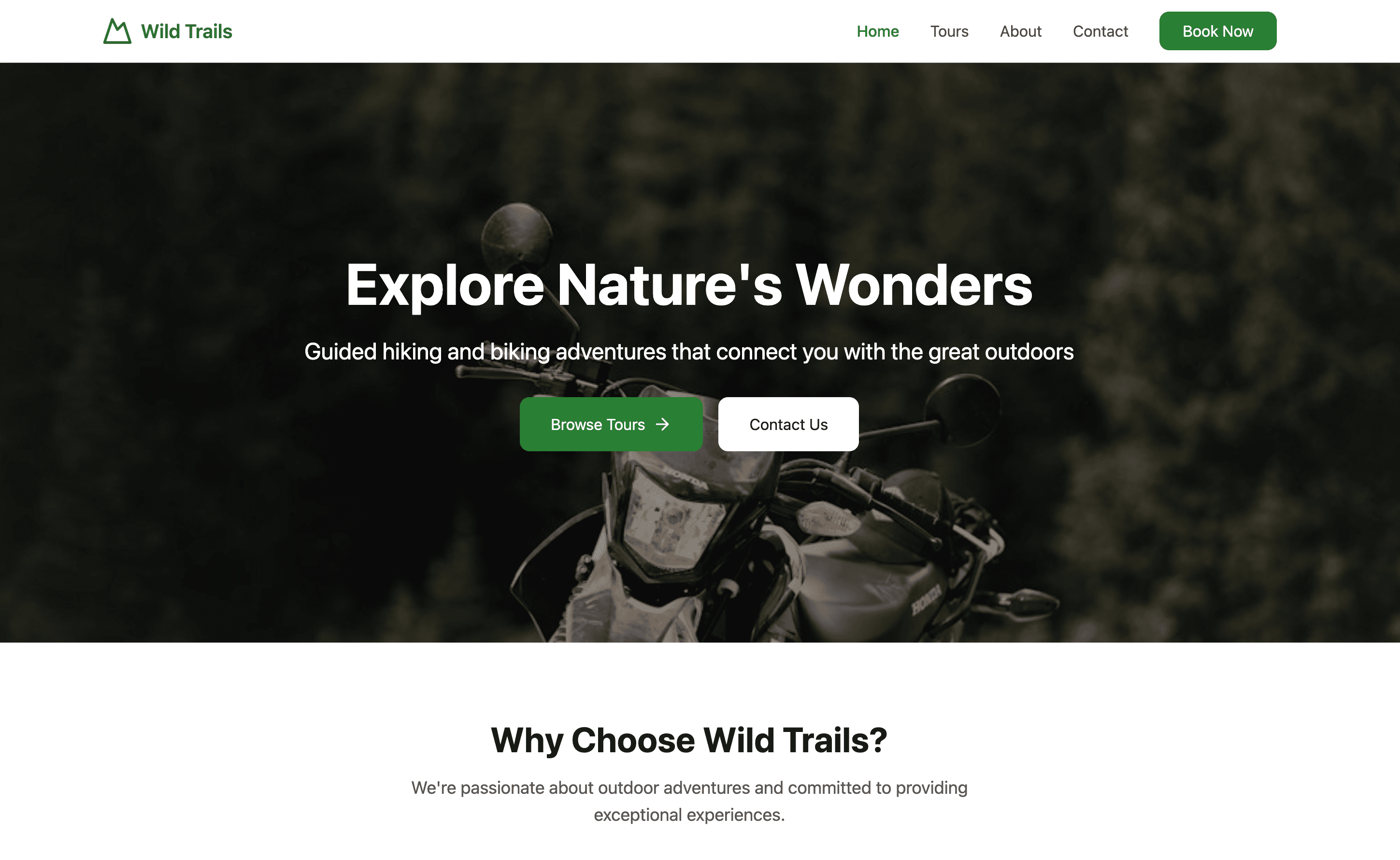
Hero generated by Figma Make
If you’ve ever asked ChatGPT how to fix something technical - your TV, your boiler, your Wi-Fi - you probably know the moment. It starts confidently. Step one, step two… sounds reasonable. Then halfway through you realise: this doesn’t match what I’m looking at. Your model is different. Your setup isn’t the same. Something’s off.
Now imagine a technician reading those instructions. They’d spot the problem instantly. “Yeah… that doesn’t apply here.”
The issue isn’t that AI is useless. It’s that it doesn’t understand context the way an expert does.
And the exact same thing is happening right now with people using AI to build their own websites.
AI Can Build You a Website. That Doesn’t Mean It’ll Build You a Good One.
Tools like Figma (with AI features like Figma Make) or Wix AI can generate a website in minutes. You give it a prompt, it gives you a layout. Done.
Except… not really.
Because what you’re getting is the equivalent of those wifi repair instructions. Generic. Pattern-based. Technically correct in places - but completely disconnected from your specific users, your business, and what actually makes a website perform.
To test this, I gave both tools a very simple brief:
Design me a website for my tour guide business. We offer guided hiking and biking tours, as well as some occasional special tours like stargazing, photography courses. I want my website to feel outdoorsy and modern.
Sounds clear enough, right?
Here’s what actually happened.
What AI Gave Me (And Where It Fell Apart)
Figma Make: Looks Like an App, Not a Service
What I got back looked more like a landing page for a startup app than a service-based tour company.
No meaningful way to filter tours
No structure for different types of experiences (hiking vs. stargazing vs. courses)
No information on guests actually need
“Book now” = a basic contact form
And funnily enough- it decided hiking and biking tours means motorcycle!
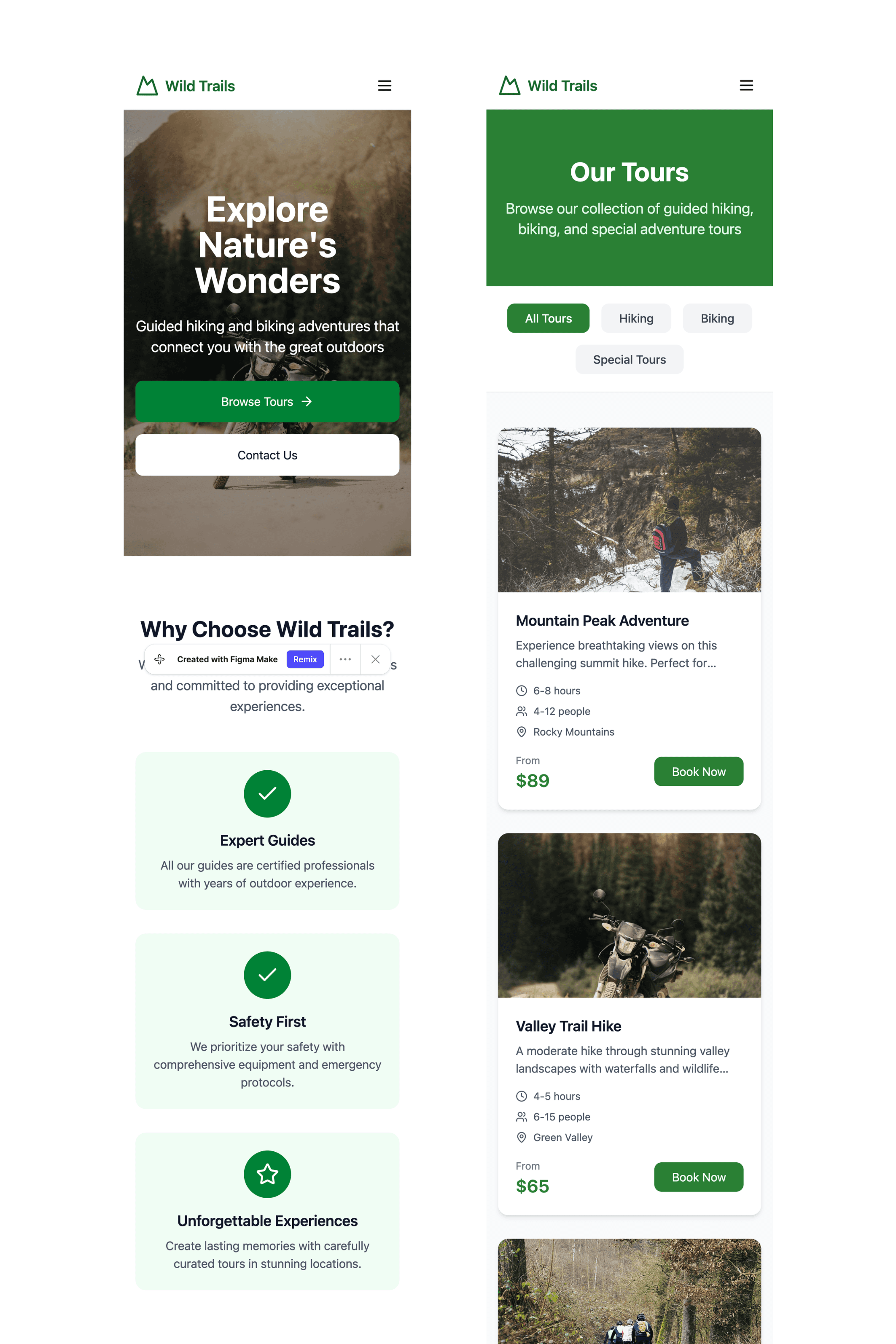
None of this is wrong technically. But it completely misses how people actually choose and book tours.
There’s no mention of:
Skill level or prerequisites
Whether it’s child-friendly
What to bring
Duration, difficulty, logistics
And here’s the key problem: AI didn’t forget this. It never knew it mattered.
A small business owner using this output wouldn’t necessarily know what’s missing unless they’ve done proper research - or already have experience in the industry.
Wix AI: Generic, Blog-Like, and Shallow
The Wix version had a completely different issue.
The design felt blocky and generic - closer to a blog than an outdoor experience brand
“Outdoorsy” translated to… green colours and AI generated outdoor imagery
The structure was extremely basic: hero, list of tours, about section
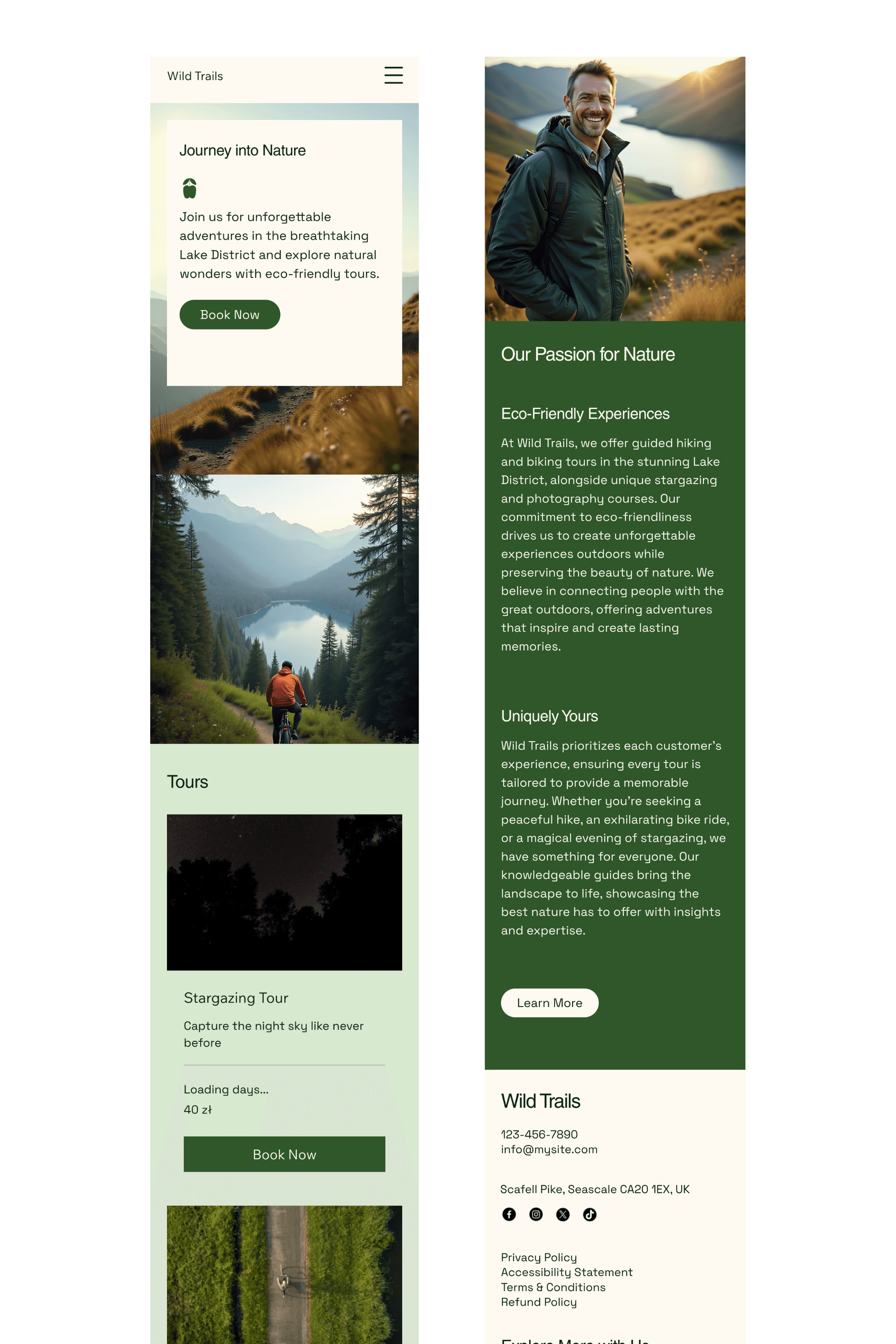
That’s it.
No filtering. No categorisation. No decision-making support for users.
Even worse, it was clearly designed desktop-first and then squeezed into mobile. In reality, most users booking tours are doing it on their phones, often on the go.
Again, nothing here is technically broken. But it’s strategically empty.
The Big Misconception: “AI Will Figure It Out”
This is where things go wrong.
AI doesn’t:
Know your customers
Understand their expectations
Anticipate their concerns
Or design around real behaviour
It predicts patterns based on existing data. That’s it.
So when you say “outdoorsy,” it doesn’t build a tailored experience. It maps that word to visual clichés - green, nature photos, maybe a mountain in the background.
A human designer, on the other hand, would:
Ask for references
Build a moodboards
Compare competitors
Translate “outdoorsy” into something specific to your audience
Same word. Completely different outcome.
“But I Still Want to Use AI” - Good. Just Use It Properly.
This isn’t a “don’t use AI” argument.
AI is a great tool. In the right hands, it speeds things up massively. Even designers use it - for ideation, prototyping, or getting unstuck.
But if you’re a small business owner trying to replace the entire design and strategy process with AI, you need to go in with realistic expectations.
Because what you’re really doing is taking on the role of:
Researcher
UX designer
Copywriter
Strategist
AI won’t do those jobs for you. It’ll just give you a starting point, or make up something that simply won't fully work for your business.
If You’re Building Your Website With AI, Watch Out For This
Before you hit publish, here’s what you actually need to think about:
1. AI Doesn’t Know Your Users (You Need To)
What are your customers trying to figure out before they book?
If you don’t know:
What questions they have
What hesitations they feel
What information they need
Your website won’t convert - no matter how “nice” it looks.
This means doing at least basic competitor research and user thinking before generating anything.
2. Structure Matters More Than Looks
Most AI-generated websites fail here.
A list of tours isn’t enough. People need help choosing.
Think:
Filters (difficulty, duration, type)
Clear categories
Comparison between options
If your site doesn’t help users decide, they won’t.
3. “Book Now” Isn’t a Strategy
A contact form is not a booking system.
Depending on your business, users might expect:
Availability calendars
Instant booking
Clear pricing and inclusions
If that’s missing, you’re creating friction, and friction means losing potential customers.
4. Mobile Isn’t an Afterthought
If your AI-generated site looks like it was designed for desktop and then squeezed into mobile… that’s a problem.
Your users are likely:
On their phones
On the move
Making quick decisions
Your design should reflect that from the start.
5. You’ll Need to Iterate (A Lot)
This is the part people underestimate.
If you go the AI route, be prepared to:
Rewrite content
Adjust layouts
Test different versions
Watch analytics and fix what’s not working
AI gives you version one. You still have to do versions two through ten.
So… Is AI Enough?
It depends on what you expect.
If you want:
A quick, basic online presence → AI can get you there
A website that actually converts visitors into customers → that’s a different game
Because just like with fixing your appliances, the instructions might look right… until they don’t.
And knowing when they don’t - that’s the difference between guessing and actually knowing what you’re doing.
Is your website not performing as it should? I help you identify issues without costly redesign through my Diagnose service.
If you’ve ever asked ChatGPT how to fix something technical - your TV, your boiler, your Wi-Fi - you probably know the moment. It starts confidently. Step one, step two… sounds reasonable. Then halfway through you realise: this doesn’t match what I’m looking at. Your model is different. Your setup isn’t the same. Something’s off.
Now imagine a technician reading those instructions. They’d spot the problem instantly. “Yeah… that doesn’t apply here.”
The issue isn’t that AI is useless. It’s that it doesn’t understand context the way an expert does.
And the exact same thing is happening right now with people using AI to build their own websites.
AI Can Build You a Website. That Doesn’t Mean It’ll Build You a Good One.
Tools like Figma (with AI features like Figma Make) or Wix AI can generate a website in minutes. You give it a prompt, it gives you a layout. Done.
Except… not really.
Because what you’re getting is the equivalent of those wifi repair instructions. Generic. Pattern-based. Technically correct in places - but completely disconnected from your specific users, your business, and what actually makes a website perform.
To test this, I gave both tools a very simple brief:
Design me a website for my tour guide business. We offer guided hiking and biking tours, as well as some occasional special tours like stargazing, photography courses. I want my website to feel outdoorsy and modern.
Sounds clear enough, right?
Here’s what actually happened.
What AI Gave Me (And Where It Fell Apart)
Figma Make: Looks Like an App, Not a Service
What I got back looked more like a landing page for a startup app than a service-based tour company.
No meaningful way to filter tours
No structure for different types of experiences (hiking vs. stargazing vs. courses)
No information on guests actually need
“Book now” = a basic contact form
And funnily enough- it decided hiking and biking tours means motorcycle!
None of this is wrong technically. But it completely misses how people actually choose and book tours.
There’s no mention of:
Skill level or prerequisites
Whether it’s child-friendly
What to bring
Duration, difficulty, logistics
And here’s the key problem: AI didn’t forget this. It never knew it mattered.
A small business owner using this output wouldn’t necessarily know what’s missing unless they’ve done proper research - or already have experience in the industry.
Wix AI: Generic, Blog-Like, and Shallow
The Wix version had a completely different issue.
The design felt blocky and generic - closer to a blog than an outdoor experience brand
“Outdoorsy” translated to… green colours and AI generated outdoor imagery
The structure was extremely basic: hero, list of tours, about section
That’s it.
No filtering. No categorisation. No decision-making support for users.
Even worse, it was clearly designed desktop-first and then squeezed into mobile. In reality, most users booking tours are doing it on their phones, often on the go.
Again, nothing here is technically broken. But it’s strategically empty.
The Big Misconception: “AI Will Figure It Out”
This is where things go wrong.
AI doesn’t:
Know your customers
Understand their expectations
Anticipate their concerns
Or design around real behaviour
It predicts patterns based on existing data. That’s it.
So when you say “outdoorsy,” it doesn’t build a tailored experience. It maps that word to visual clichés - green, nature photos, maybe a mountain in the background.
A human designer, on the other hand, would:
Ask for references
Build a moodboards
Compare competitors
Translate “outdoorsy” into something specific to your audience
Same word. Completely different outcome.
“But I Still Want to Use AI” - Good. Just Use It Properly.
This isn’t a “don’t use AI” argument.
AI is a great tool. In the right hands, it speeds things up massively. Even designers use it - for ideation, prototyping, or getting unstuck.
But if you’re a small business owner trying to replace the entire design and strategy process with AI, you need to go in with realistic expectations.
Because what you’re really doing is taking on the role of:
Researcher
UX designer
Copywriter
Strategist
AI won’t do those jobs for you. It’ll just give you a starting point, or make up something that simply won't fully work for your business.
If You’re Building Your Website With AI, Watch Out For This
Before you hit publish, here’s what you actually need to think about:
1. AI Doesn’t Know Your Users (You Need To)
What are your customers trying to figure out before they book?
If you don’t know:
What questions they have
What hesitations they feel
What information they need
Your website won’t convert - no matter how “nice” it looks.
This means doing at least basic competitor research and user thinking before generating anything.
2. Structure Matters More Than Looks
Most AI-generated websites fail here.
A list of tours isn’t enough. People need help choosing.
Think:
Filters (difficulty, duration, type)
Clear categories
Comparison between options
If your site doesn’t help users decide, they won’t.
3. “Book Now” Isn’t a Strategy
A contact form is not a booking system.
Depending on your business, users might expect:
Availability calendars
Instant booking
Clear pricing and inclusions
If that’s missing, you’re creating friction, and friction means losing potential customers.
4. Mobile Isn’t an Afterthought
If your AI-generated site looks like it was designed for desktop and then squeezed into mobile… that’s a problem.
Your users are likely:
On their phones
On the move
Making quick decisions
Your design should reflect that from the start.
5. You’ll Need to Iterate (A Lot)
This is the part people underestimate.
If you go the AI route, be prepared to:
Rewrite content
Adjust layouts
Test different versions
Watch analytics and fix what’s not working
AI gives you version one. You still have to do versions two through ten.
So… Is AI Enough?
It depends on what you expect.
If you want:
A quick, basic online presence → AI can get you there
A website that actually converts visitors into customers → that’s a different game
Because just like with fixing your appliances, the instructions might look right… until they don’t.
And knowing when they don’t - that’s the difference between guessing and actually knowing what you’re doing.
Is your website not performing as it should? I help you identify issues without costly redesign through my Diagnose service.

Let's Talk!
Are you a small hospitality business owner who wants clearer online setup, smoother guest communication, or simply less admin stress?